
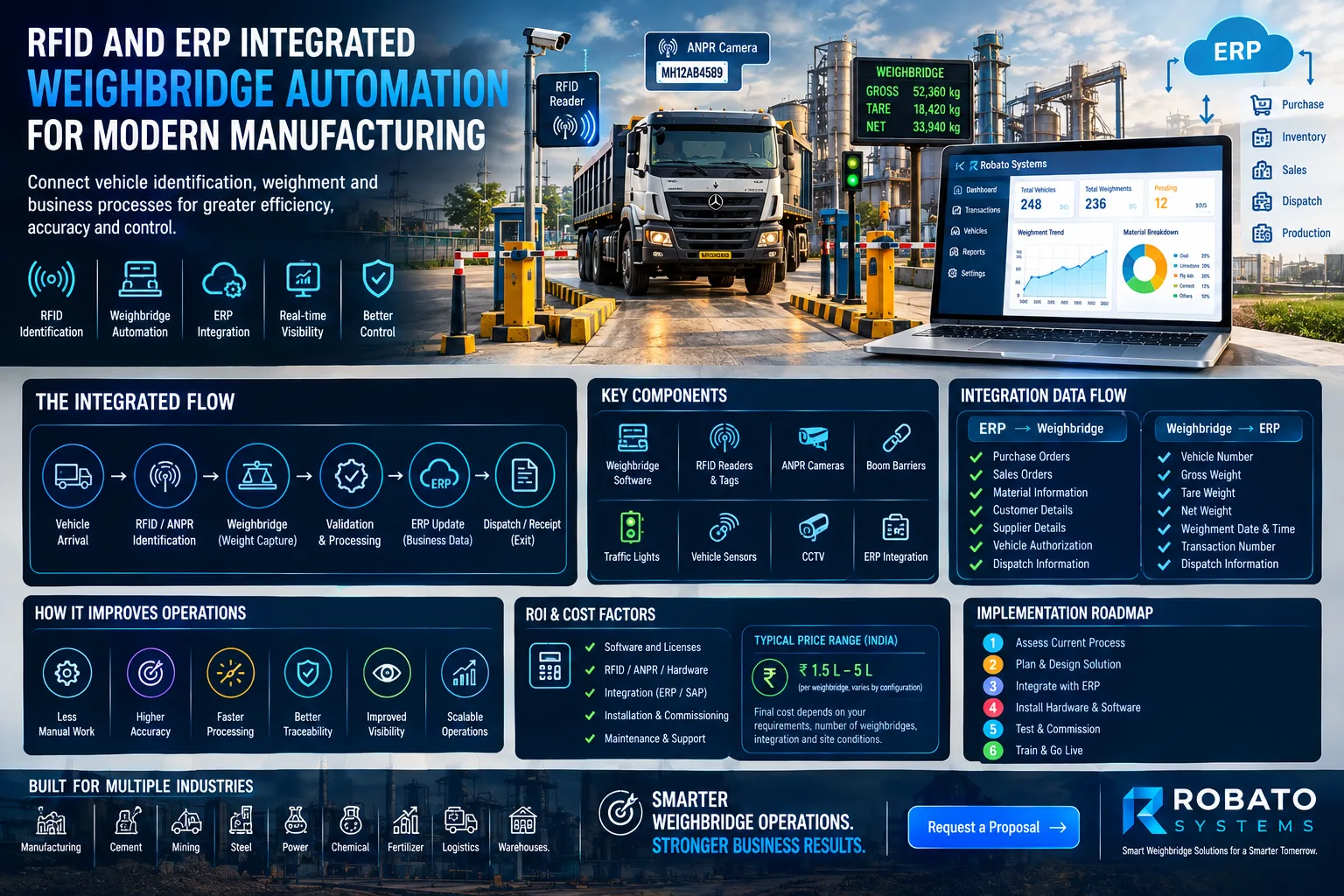
Modern manufacturing plants handle a continuous movement of raw materials, finished products, suppliers, transporters, and commercial vehicles. The weighbridge is often one of the key points where this movement is measured and recorded.
When vehicle identification, weighing, and business transactions are handled separately, operators may need to enter the same information multiple times. This can slow down vehicle processing and make it harder to maintain consistent records.
RFID and ERP integrated weighbridge automation connects vehicle identification, weighing, and business data into a more structured digital workflow.
What Is RFID and ERP Integrated Weighbridge Automation?
An integrated weighbridge system connects RFID-based vehicle identification with weighing software and the plant's ERP system.
A typical process can look like:
RFID Vehicle Identification → Weighbridge → Transaction Validation → ERP → Dispatch/Receipt → Digital Record
RFID identifies the registered vehicle, while the weighbridge captures the weight. The automation software manages the transaction and can exchange relevant information with the ERP system.
The exact workflow depends on the plant's business process and integration requirements.
How RFID Works at a Weighbridge
RFID tags can be assigned to registered vehicles. When a vehicle approaches the designated RFID reader, its tag can be detected automatically.
The system can then associate the vehicle with stored information such as:
Vehicle number
Transporter
Vehicle type
Supplier or customer
Material
Authorization status
This can reduce the need for operators to manually identify every vehicle.
How ERP Integration Fits Into the Process
ERP systems contain important business information related to purchasing, inventory, sales, production, and dispatch.
By integrating the weighbridge with the ERP, relevant information can move between the systems instead of being entered manually at multiple stages.
For example:
ERP Order → Vehicle Arrival → RFID Identification → Weighment → Weight Validation → ERP Update → Dispatch
This creates a connected transaction flow from the business order to the physical movement of material.
Benefits of RFID and ERP Integration
1. Automated Vehicle Identification
RFID can identify registered vehicles without requiring the operator to manually enter the vehicle number for every transaction.
2. Reduced Data Entry
Information already available in the system can be reused during the weighbridge transaction, reducing repetitive entries.
3. Better Transaction Traceability
The system can maintain a digital relationship between the vehicle, weight, material, order, and transaction.
4. Improved Dispatch Control
ERP information can be used as part of the dispatch validation process, depending on the organization's workflow.
5. Faster Vehicle Processing
Automated identification and data retrieval can reduce some manual steps during vehicle movement.
The actual improvement depends on plant layout, vehicle volume, network performance, and the overall process design.
What Information Can Be Exchanged?
The exact data exchange depends on the ERP and project requirements, but it may include:
From ERP to Weighbridge System
Purchase orders
Sales orders
Material information
Customer details
Supplier details
Vehicle authorization
Dispatch information
From Weighbridge to ERP
Vehicle number
Gross weight
Tare weight
Net weight
Weighment date and time
Transaction number
Dispatch information
This reduces the need to maintain the same information independently in different systems.
RFID vs Manual Vehicle Identification
With a manual process, an operator may need to:
Ask for vehicle details
Enter the vehicle number
Verify the vehicle
Select the required transaction
Capture the weight
Complete the transaction
With RFID automation, the vehicle can be identified automatically when the RFID tag is detected.
The operator can then focus on exceptions and activities that require human intervention.
Can ANPR Be Added?
Yes. RFID and ANPR can be used together when additional vehicle verification is required.
For example:
RFID → Vehicle Identification
ANPR → Number Plate Verification
Weighbridge → Weight Capture
ERP → Business Validation
Using multiple identification methods can provide additional control, depending on the plant's security and operational requirements.
Integrating Barriers and Traffic Lights
RFID and ERP integration can also be combined with physical vehicle movement controls.
For example:
Vehicle approaches entry point.
RFID identifies the vehicle.
System validates its status.
Entry barrier opens.
Vehicle moves onto the weighbridge.
Weight is captured.
Transaction is processed.
Exit authorization is provided.
Traffic lights, boom barriers, sensors, and displays can be incorporated depending on the plant layout.
Important Considerations Before ERP Integration
ERP integration should be planned carefully before implementation.
Consider:
ERP platform
Available APIs or interfaces
Data fields
Authentication requirements
Transaction workflow
Error handling
Network connectivity
Offline scenarios
Data synchronization
User permissions
A proper integration design can help avoid data duplication and inconsistent transaction records.
Handling Exceptions
A production system should also account for situations where the normal workflow does not work.
Examples include:
RFID tag not detected
Invalid vehicle
Incorrect material
Weight mismatch
Communication failure
ERP unavailable
Duplicate transaction
Network interruption
The system should provide an appropriate exception workflow instead of allowing such situations to create inconsistent records.
Why Data Security Matters
The weighbridge can contain commercially important information about material movement and vehicle transactions.
Organizations should consider controls such as:
Role-based access
User authentication
Transaction logs
Audit trails
Controlled data modification
Database backups
Secure system communication
The exact security architecture should be designed according to the organization's infrastructure and requirements.
How to Implement RFID and ERP Weighbridge Automation
A practical implementation can be divided into stages.
Step 1: Study the Existing Process
Document vehicle entry, weighing, material verification, dispatch, and exit procedures.
Step 2: Review Existing Equipment
Check weighing indicators, RFID requirements, cameras, barriers, sensors, and network infrastructure.
Step 3: Define ERP Integration
Identify which information needs to move between the ERP and weighbridge system.
Step 4: Implement RFID
Register vehicles and configure RFID identification points.
Step 5: Automate the Weighbridge Workflow
Connect identification, weighing, validation, and transaction processing.
Step 6: Test Integration
Test normal transactions as well as exceptions and communication failures.
Step 7: Train Operators
Operators should understand both the automated workflow and the procedures for handling exceptions.
How Robato Systems Can Help
Robato Systems can help industrial organizations design weighbridge automation around their existing vehicle and material movement processes.
Depending on requirements, the solution can include:
RFID vehicle identification
Automated weighment
ERP integration
ANPR
CCTV integration
Boom barriers
Traffic lights
Digital transaction management
Dispatch automation
Reporting and dashboards
The system can be planned according to the plant's current infrastructure and expanded as automation requirements grow.
Final Thoughts
RFID and ERP integrated weighbridge automation can connect physical vehicle movement with digital business processes.
Instead of treating vehicle identification, weighing, and ERP transactions as separate activities, an integrated system can create a connected workflow from vehicle arrival to material dispatch or receipt.
For manufacturing plants, the right implementation should consider the existing weighbridge, RFID infrastructure, ERP environment, vehicle volume, security requirements, and future scalability.
Request a Proposal
Looking to connect your weighbridge with RFID and ERP systems? Request a proposal from Robato Systems to discuss your existing infrastructure and automation requirements.
FAQs
What is RFID integrated weighbridge automation?
It is a system where RFID technology automatically identifies registered vehicles and connects their information with the weighbridge transaction.
What is ERP integration in a weighbridge system?
ERP integration allows relevant business information to be exchanged between the weighbridge automation system and the organization's ERP platform.
Can RFID and ANPR be used together?
Yes. RFID can identify a registered vehicle while ANPR can provide number-plate verification as an additional identification method.
Can an existing weighbridge be integrated with RFID and ERP?
Depending on the weighing indicator, communication interfaces, and ERP environment, an existing weighbridge can potentially be integrated into an automated system.
What are the main benefits of RFID and ERP integration?
Potential benefits include reduced manual data entry, automated vehicle identification, improved traceability, better dispatch control, and a more connected flow of operational and business information.